Gaussian Splatting is rapidly becoming one of the most powerful ways to bring real-world environments into real-time engines like Unreal Engine. Thanks to tools like Volinga, what used to take days of photogrammetry processing can now be turned into a high-fidelity, relightable 3D environment in a fraction of the time.
But the truth is this: no amount of software magic can fix a poorly captured scene. The capture process is the foundation, and when it’s done well, Volinga and Unreal Engine can perform at their highest potential.
What follows is a field-tested guide from a working 3D artist on how to capture Gaussian Splats the right way.
Preparing the Capture
In Gaussian Splatting, success starts long before you press record. It begins with the routine. A clean lens. A full battery. Enough storage. The small details matter because every flaw ends up baked into the final model.
I lock three settings before shooting anything:
Manual focus
Locked exposure
Manual white balance
These never change once I begin. Gaussian Splats depend on visual consistency. If the camera is constantly refocusing or adjusting brightness, the final 3D scene becomes uneven and unstable.
I also walk the location before shooting, plotting routes and safety zones. The camera session should feel like a rehearsed motion, not improvisation.
But the truth is this: no amount of software magic can fix a poorly captured scene. The capture process is the foundation, and when it’s done well, Volinga and Unreal Engine can perform at their highest potential.
What follows is a field-tested guide from a working 3D artist on how to capture Gaussian Splats the right way.
Source: Realint Project
Movement
If I had to reduce Gaussian Splatting to one sentence, it would be: You must move and the movement must create parallax. Stillness gives you nothing. Parallax gives you depth.
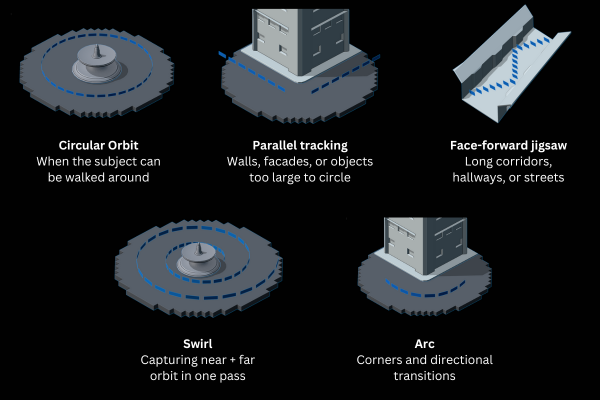
I keep motion smooth, stable, and predictable. No sudden turns. No speed spikes. And I never change settings mid-shot. Depending on the space, I rotate between a few reliable movement patterns:
Each technique has one goal: overlap and shifting perspective. The more the model sees the same features from new angles, the better the reconstruction.
Capturing What Surrounds You
City
These environments are hubs of constant change, so we must stay alert to capture clean data without interference. Vehicles, people, and animals can enter the dataset unintentionally. I recommend capturing still images instead of video. By moving and changing position, you can observe the environment and prevent interference before each shot.
Nature
Outdoors present complexity depending on the environment type, especially those with dense vegetation such as forested areas. A key requirement for a sharp 3DGS model is no environmental movement so wind can be a problem. Forest environment can also present wide luminosity contrasts. Before capture, spend extra time adjusting camera settings and testing in the area. Regularly check and clean equipment and lenses to avoid dust and dirt.
Sunset/Sunrise
The golden hour can be challenging, especially due to the short time span it lasts and the changes in tone and light intensity. If the area to capture is not extensive, wait until the sun is above the horizon so that harsh shadows are softened and the changes in light are less drastic. In these cases, I would recommend capturing video to cover the area in the shortest possible time and calibrate the exposure of the equipment with the back to the sun to avoid underexposed areas on surfaces.
Indoors
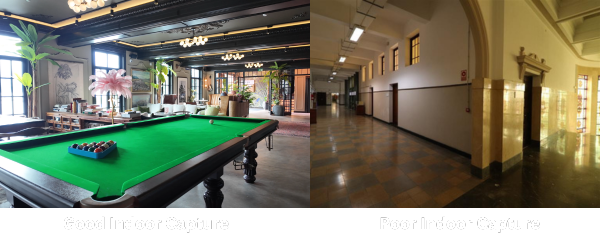
Indoor scenes seem controlled, but artificial lighting can be unpredictable:
Light sources differ in color temperature
Bulbs flicker at different frequencies
Windows introduce subtle and sudden shifts
And in low light, you eventually have to choose between noise or blur, and noise is always the lesser evil. If it gets extremely dark, a tripod and timed shutter are safe backups, but the key is to avoid motion blur at all costs. When something feels off indoors, I record the area again. Light changes quickly, especially near windows and reflective surfaces.
Tips for better 3DGS scenes
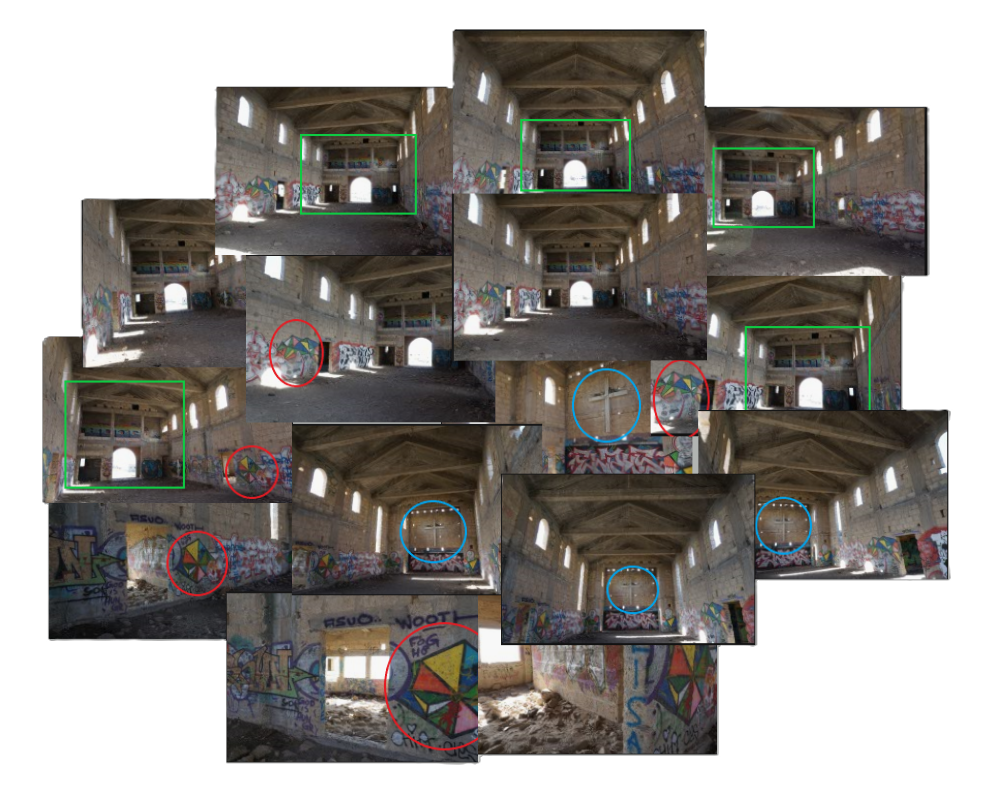
Overlap: The keys to master 3DGS capture
The reconstruction process to obtain a Gaussian model from images is similar to assembling a puzzle piece by piece. Between one piece and another (Piece=image), there must be a relationship that indicates its position within that space relative to the other pieces. This point, along with parallax, is where the fundamental basis for creating a well-structured Gaussian model lies.
Lighting & Weather
Lighting doesn’t just influence Gaussian Splats. It decides whether they succeed.
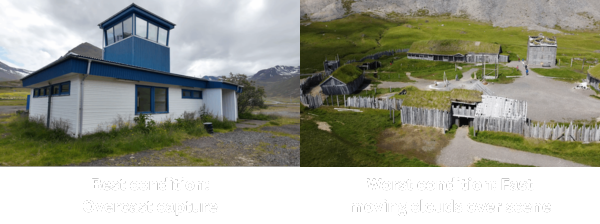
For outdoor work, nothing beats overcast weather. Cloudy skies give you even exposure, low contrast, and soft shadows. This produces clean Gaussian Splats that respond beautifully to relighting later inside Unreal Engine via Volinga.
The worst condition is windy weather with fast-moving clouds. It creates fluctuating lighting across frames, which becomes visible as brightness flickering inside the 3D model.
Splitting the Capture
Sometimes the best capture strategy is not one continuous session.
For large environments or locations with drastically different lighting sections (like indoor → outdoor), I break the space into chunks. Each chunk becomes a standalone capture and training run. Later, these can be combined while preserving detail.
Trying to make everything one take almost always creates lighting inconsistencies that Volinga or Unreal Engine then have to fight against.
Final Thoughts
You don’t need a $10,000 camera to get incredible Gaussian Splats. You need:
Stable, locked-in camera settings
Predictable and controlled movement
Lighting that doesn’t fluctuate
Overlap and parallax in every section of the scene
When you give the model predictable visual information, Volinga and Unreal Engine do the rest, producing impressive, relightable real-time 3D environments for virtual production, games, VFX, and beyond.
The beauty of Volinga is that it frees artists from time-consuming photogrammetry cleanup and lets them focus on creativity. When a scene is captured with intention and care, the Unreal workflow becomes fast and joyful.
If you’re learning Gaussian Splatting, just remember: perfection isn’t required. Predictability is. Capture with consistency, and Volinga will reward you with stunning results.
Want to learn more about how to capture splats from our community? Join the Volinga Discord Channel to start collaborating with other artists!
Credits
Written by: Marcos Ernesto García Muñoz, 3D Artist at Volinga