
An R&D AI Workflow
Recent advances in AI are rapidly transforming how digital environments are created. Tasks that once required extensive manual modeling, texturing, and lighting can now be accelerated through generative workflows and techniques like 3D Gaussian Splatting (3DGS).
At Volinga, we’re focused on pushing the boundaries of what’s possible with these emerging technologies. In this experiment, we set out to build a complete pipeline from an initial concept to a fully realized 3D Gaussian Splat environment using a combination of AI tools and iterative workflows.
Objective: Showcase a workflow for generating digital background environments using AI, from an initial visual concept to the creation of a 3DGS model in WorldLabs.
Compared to traditional geometry, 3DGS is better suited for real-time applications. It reduces scene weight while maintaining strong visual quality, making it ideal for:
This workflow emphasizes control and iteration at every stage, enabling fast creation without sacrificing artistic direction.
1. Concept to Image with NanoBanana
Every environment starts with a clear idea. Using NanoBanana, we generate an initial image from a detailed prompt. Because AI image generation is inherently iterative, prompt quality is critical. The more precise the description, the more control you retain over the output.
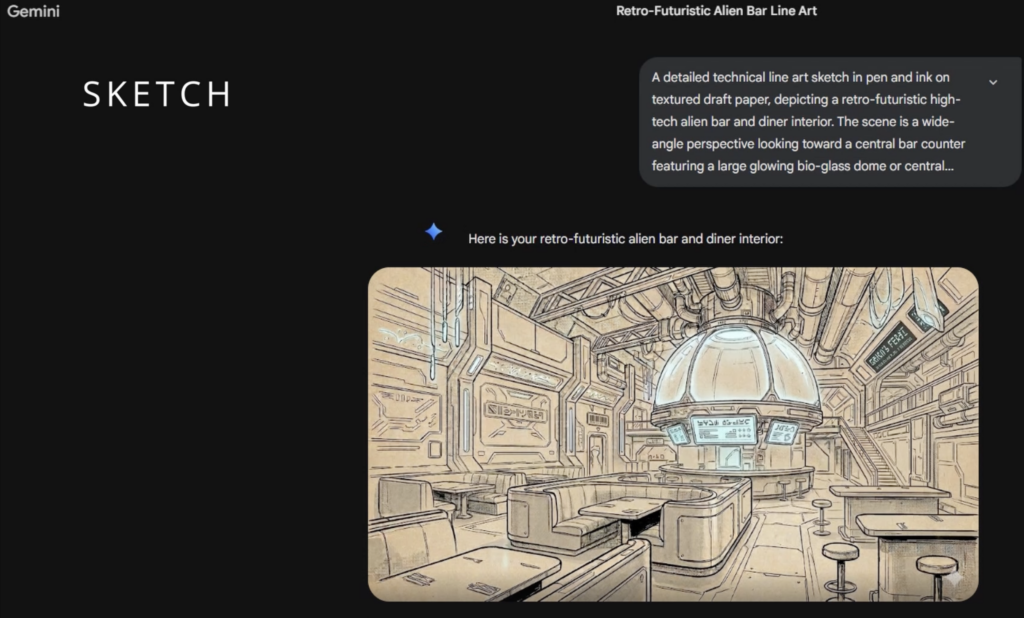
Sketch prompt:
“A detailed technical line art sketch in pen and ink on textured, antique beige draft paper, depicting a retro-futuristic high-tech alien bar and diner interior. The scene is a wide-angle perspective looking toward a central bar counter featuring a large glowing bio-glass dome or central reactor, with a pulsing cyan-blue neon glow illuminating intricate overhead pipes and conduits. The style is clean architectural line drawing with minimal cross-hatching for shadow. In the foreground and midground are multiple dining tables with flatware place settings and U-shaped padded vinyl booth seating with metallic trim and integrated panels. To the right, high bar tables with metal disc barstools. The central bar has translucent hologram display screens and touch panels showing intricate alien script and technical charts. Additional wall signs and glowing placards in the background show stylized, unreadable sci-fi text. Walls are composed of modular brushed-metal panels with exposed ducting and industrial fixtures. Hanging string lights from the ceiling have cyan-blue neon bulbs casting minimal highlights. A narrow industrial metal staircase ascends to an upper catwalk level on the right. Visible subtle paper texture throughout.”
This generates a structured concept image, which we then refine using a second prompt.
Render prompt: “Render this sketch into a photorealistic photo of that futuristic space restaurant.”
At this stage, we move from concept art to a more realistic visual foundation while preserving composition and design intent.
2. Converting to Equirectangular Format
Before moving into 3D generation, the image must be converted into a 360° equirectangular panorama (2:1 aspect ratio).
Why this matters:
Equirectangular prompt: “Create a seamless 360 equirectangular panorama (aspect ratio – 2:1) from last image.”
This is one of the most critical steps in the pipeline. A clean, seamless panorama ensures the AI correctly interprets spatial relationships during world generation.
3. Optional AI Upscaling
If the generated image lacks resolution, AI upscaling can enhance detail and sharpness before world generation. However, this step requires caution:
Maintaining seamless edges is essential to avoid artifacts in the 3D result.
4. World Generation in WorldLabs
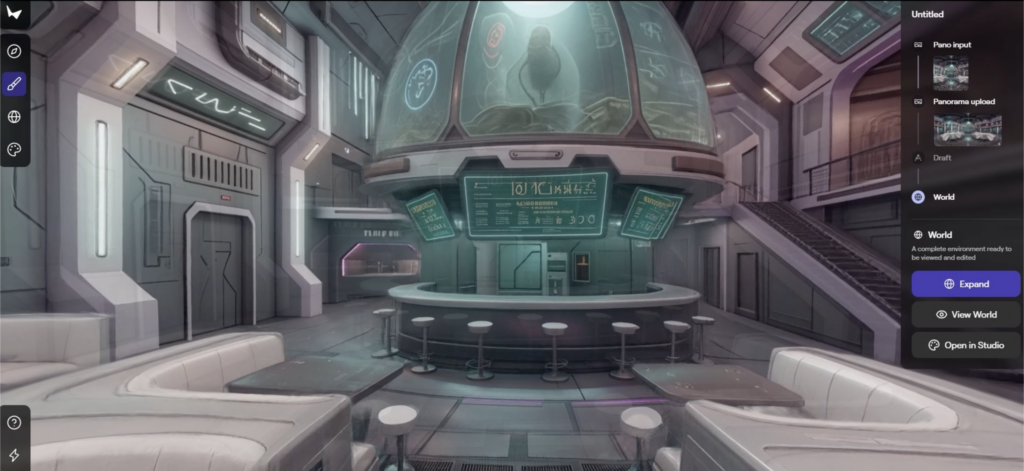
With the panorama ready, we move into WorldLabs to generate the 3D Gaussian Splat.
Key inputs:
The system processes the panorama and reconstructs it into a dense 3DGS representation.
Important behaviors:
Once complete, the scene can be exported as .ply (3DGS dataset) or .glb (proxy mesh).
5. Rendering in Unreal Engine with Volinga
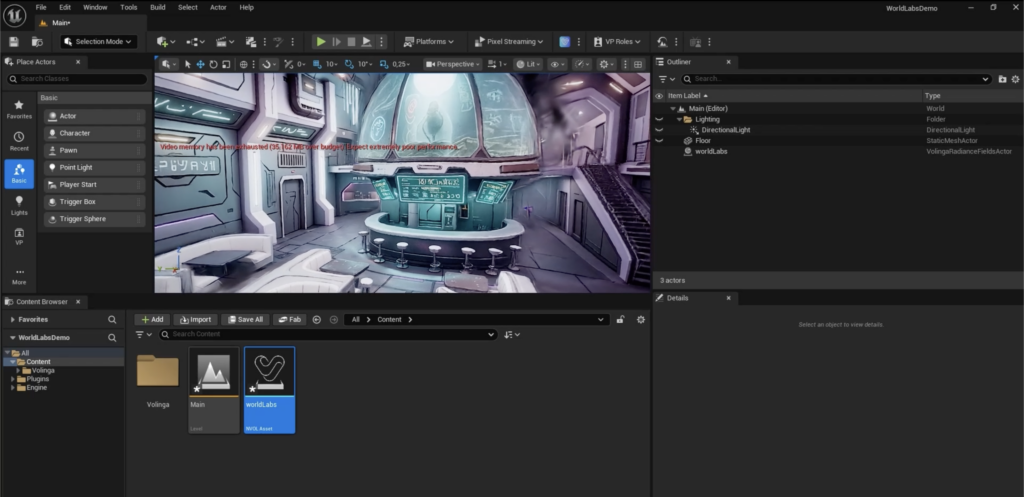
The final step brings everything into a real-time environment. Using the Volinga Plugin:
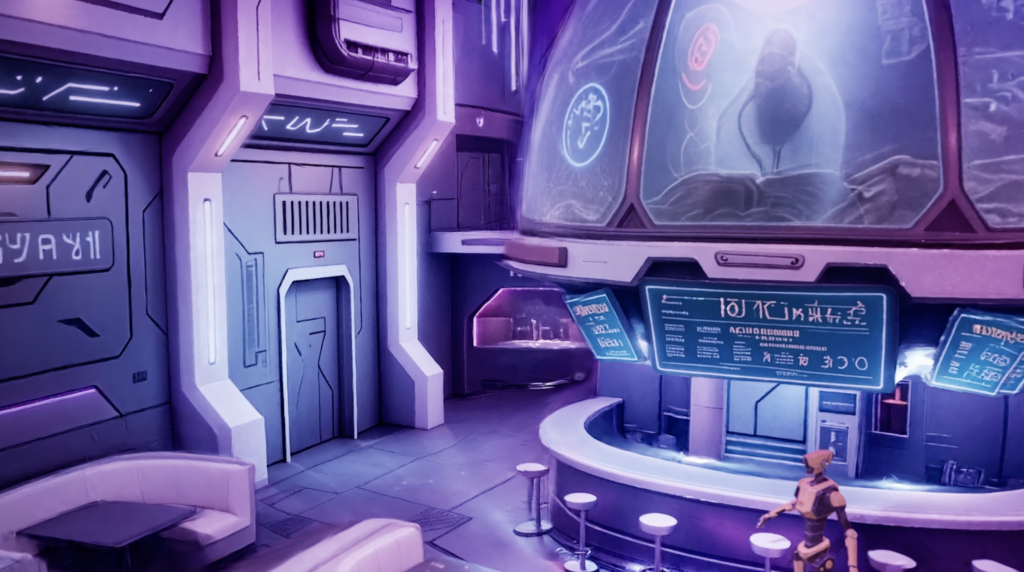
From here, we:
Relighting is where the environment truly comes to life and integrates into a broader production pipeline.
This workflow demonstrates how AI can compress what was once a complex, multi-step 3D pipeline into a fast, iterative process.
What worked well:
Limitations observed:
With this workflow, it give you an example of a powerful way to create concept art and previs tools. This experiment reflects how Volinga approaches innovation: by testing, iterating, and pushing emerging technologies like 3D Gaussian Splatting into practical, production-ready workflows.
By combining tools like NanoBanana and WorldLabs, creators can move from idea to immersive 3D environment faster than ever before while still maintaining creative control. Essentially, this allows for quick and easy ways to supercharge productions.